Posts

Cricut Joy: Rolled Paper Flowers on Easter Eggs

Cricut Joy: Rolled Paper Flowers on Easter Eggs Have you used the Cricut Joy yet? It's small, simple to use, yet has the capacity of a great cutting machine. Check out this post on getting started with the Cricut Joy. This week I've been filling my days with crafting. Instead of running to the store, I'm using supplies I have at home. This Easter egg craft with rolled paper flowers is simple to make, and you probably have all the things needed to make them too! Cricut sent me the Cricut Joy as part of their blogging team. All opinions and ideas are my own. Affiliate links included in post. Plus, you might have seen this project on my insta stories last week. The Cricut Joy is adorable! I love the small and convenient size, easy to store and easy on the budget. This fun project uses supplies I had laying around at home and only takes a few minutes! Supplies Needed for Rolled Paper Flowers on Easter Eggs: Cricut Joy Colored Paper (Use ol...
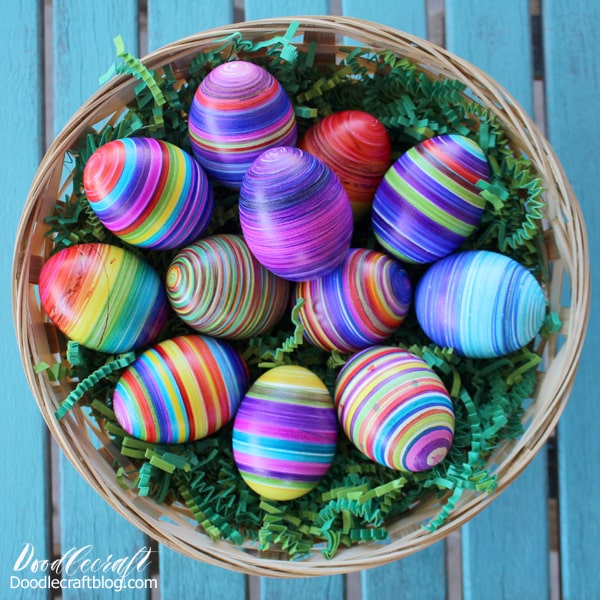
EggMazing Striped Easter Eggs DIY!

EggMazing Striped Easter Eggs DIY! I love simple crafts, although I've never really been fond of decorating eggs, not quite sure why.  However, this is my new favorite way to decorate an egg.  The EggMazing spinner is simple to use and works like a charm.  Create stunning eggs in ombres, stripes, rainbows and more using the  EggMazing .     The  EggMazing  spins the egg at a steady pace and you just need to add marker to it.  The best part is that it's perfect for all ages!  My nearly 72 year old dad made a couple eggs, as did my nearly 5 year old neighbor...so great for any age that you would give a marker to. I'm not usually a fan of painting eggs. I love painting rocks, but for some reason, I just don't do well with eggs. Maybe because there's not a "top" side...they don't really sit on their own...or because I'm not patient. So I wasn't sure how much I'd like adding stripes to eggs. It's pretty simple decoration and I ...

Laser Cut Calligraphy Wood Sign with xTool M1

How to Laser Cut Calligraphy Wood Sign with xTool M1 Make the perfect wood sign or holiday decor with your own calligraphy or hand lettering! Watch how easy it is to transform your own lettering into a wood cutout using the xTool M1 laser cutter. I picked the word Happiness because I love to write it in calligraphy. Pick a word that you love!  It could be your Word of the Year! Supplies Needed for Laser Cut Calligraphy Sign: xTool M1 Everything Bundle 3mm  Basswood xTool Creative Space Software Dollar Tree Wooden Hanging Sign E6000 Glue Step 1: Design your Image Begin by writing out your desired word. I used my iPad and procreate app. If you are doing it on paper; digitize it by taking a photo or scanning it. Then remove the background (I use Photoshop). Save the image as a PNG file. Step 2: Import PNG File Then import your PNG file into XCS.  Select the image and then click the 'Offset Distance' tab to 0. This will outline the image you created exactly. Step 3: Select CU...